There is no doubt that 3D printers make our lives easier. With the use of 3D printers, slicing programs that help transform virtual objects into reality are very important. We use open source slicers such as Cura and Slic3r, which are already performing well. But how does the algorithm behind this complex code base work? In this series, we will look for the answer to this question. We can examinate this question in 3 part.
- Triangle Plane Intersection
- Reordering intersection points and shell generation
- Infill algorithms
Triangle Plane Intersection
When we want to get a toolpath from a 3D mesh structure, we need to get the answer from the triangles that make up the mesh structure. For this, it is necessary to know the points where a plane contacts the triangle.
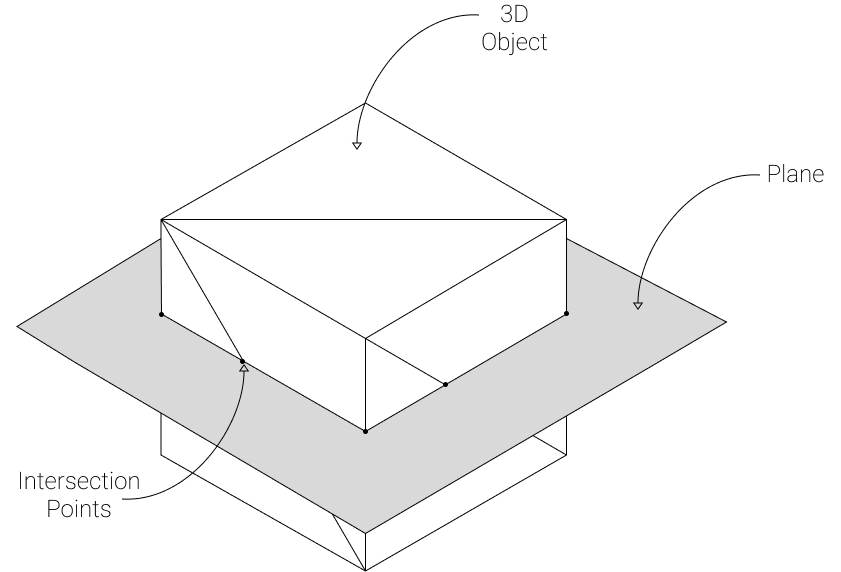
As you can see the image above, Plane intersect with triangles that belongs to 3D Cube. The sum of intersection points gives huge clue about path that nozzle of 3D printers must follow. We can generate this algorithm with C++.
First we create struct for Plane, Triangle and TriangleIntersect for embody triangle plane mechanism.
struct Triangle
{
	Point a;
	Point b;
	Point c;

	Vertex& aV;
	Vertex& bV;
	Vertex& cV;
};

struct Plane {
	glm::vec3 normal;
	float distance;
};

struct TriangleIntersect
{
	int intersectionPointCount = 0;
	std::vector<Point> points;
};
As we know, triangle and plane may intersect more than one way. There are two scenario for this position. Not every point of the triangle is on the same side of the plane. Every point of the triangle is on the plane. For calculating this, we need to check intersection to every line of the triangle with plane. In this case, starting from the distance between the two ends of the line and the plane, each point of the triangle is checked on which side of the plane it is.
float DistFromPlane(const Point& pt, const Plane& plane)
{
	return glm::dot(pt, plane.normal) - plane.distance;
}

bool GetSegmentPlaneIntersection(Point P1, Point P2, Point& outP, Plane p)
{
	float d1 = DistFromPlane(P1, p);
	float d2 = DistFromPlane(P2, p);
	if (d1 * d2 > 0)
		return false;
	float t = d1 / (d1 - d2);
	outP = P1 + t * (P2 - P1);
	return true;
}

void TrianglePlaneIntersection(Triangle tri, Plane p, std::vector<TriangleIntersect>& outSegTips)
{
	TriangleIntersect triInt;
	Point IntersectionPoint;
	if (GetSegmentPlaneIntersection(tri.a, tri.b, IntersectionPoint, p))
		if (!isnan(IntersectionPoint.x))
		{
			triInt.intersectionPointCount += 1;
			triInt.points.push_back(IntersectionPoint);
		}
	if (GetSegmentPlaneIntersection(tri.b, tri.c, IntersectionPoint, p))
		if (!isnan(IntersectionPoint.x))
		{
			triInt.intersectionPointCount += 1;
			triInt.points.push_back(IntersectionPoint);
		}
	if (GetSegmentPlaneIntersection(tri.c, tri.a, IntersectionPoint, p))
		if (!isnan(IntersectionPoint.x))
		{
			triInt.intersectionPointCount += 1;
			triInt.points.push_back(IntersectionPoint);
		}
	if(triInt.intersectionPointCount > 0)
	{
		outSegTips.push_back(triInt);
	}
}
After calculating intersection points with plane and bunch of triangles, we have to do this calculation for every distance of Z axis of the 3D object. In this point we have to know the layer heigth (offset distance) of 3D printer. So as an example, if we use 0.2mm for layer heigth we have to calculate intersection for every 0.2 mm. In other words, the plane is moved up 0.2 mm after each calculation and the intersection points are recalculated.
We are gonna cover detailed this topic in the next episode.
For detailed explanation and little more theory check Gabor Szauer’s Game Physics Cookbook and his github repo. Also you can reach main intersection algorithm from here.
I hope it helps. If you have any issues or question dont hesitate to contact with me.